Toprated

Vendor

Example product title

Regular price From $140.49 USD
Sale price From $140.49 USD Regular price $0.00 USD

Vendor

Example product title

Regular price From $140.49 USD
Sale price From $140.49 USD Regular price $0.00 USD

Vendor

Example product title

Regular price From $140.49 USD
Sale price From $140.49 USD Regular price $0.00 USD

Vendor

Example product title

Regular price From $140.49 USD
Sale price From $140.49 USD Regular price $0.00 USD

Vendor

Example product title

Regular price From $140.49 USD
Sale price From $140.49 USD Regular price $0.00 USD

Vendor

Example product title

Regular price From $140.49 USD
Sale price From $140.49 USD Regular price $0.00 USD

Testimonials

Sophia M.

I absolutely adore my new Streetwear Y2k Ruffles Mini Skirt from H&M Clothing! The fit is perfect, the ruffles are so cute, and the high waist makes it super flattering. I’ve worn it for a summer outing and even got compliments from friends it’s exactly the sweet, kawaii vibe I was looking for. Totally worth it!

Emma L.

I just got the Portable Electric Juicer USB Charging from H&M Clothing, and I’m honestly loving it! It’s so easy to use — I can make fresh orange juice in seconds, even at my desk or while traveling. The mini size is perfect, and cleanup is super quick. Honestly, I didn’t think a little blender could make my mornings this easy!

Liam R.

I’ve been using the Power-Beats Pro Wireless Headphones from H&M Clothing, and they’ve completely changed my workout sessions! The sound is crisp, the noise-canceling works perfectly, and they stay put even during intense runs. Plus, being waterproof is a total lifesaver. Totally worth every penny!

Bestseller

Skip to product information
1 of 5

FOXWELL T2000 PRO Auto Tire Pressure Tool Reset TPMS Relearn Activate Sensors Programming Car OBD2 Code Reader Diagnostic Tools

Regular price $140.49 USD
Sale price $140.49 USD Regular price $0.00 USD
Sale Sold out
Shipping calculated at checkout.
Color
Ships From
In stock (54 units), ready to be shipped
  • Vendor:

    Hector & Maison

Description

SPECIFICATIONS

Brand Name: FOXWELL

Certification: CE

Communication Interface: Bluetooth

Display Size: Others

Electronic: Yes

External Testing Certification: ce

Hardware Version: Newest

High-concerned chemical: None

Is Batteries Included: No

Item: FOXWELL T2000 PRO

Item Height: 7.5

Item Length: 33

Item Type: Other

Item Weight: 1.5

Item Width: 22.5

Material: Plastic

Model Name: T2000 PRO

Origin: Mainland China

Power (W): w

Software Update: Yes

Software Version: Newest

Special Features: Bluetooth

Upgrade: Free Upgrade Online Forever

Use: Not Telecommunication

Voltage: v

Warranty: 2 Years Warranty

Wireless Support: No

Recommend Purchase FOXWELL Sensor T10/T20 Together

Please note that the FOXWELL T2000 Pro programming function is exclusively compatible with the FOXWELL T20 sensor. It does not support sensors from other manufacturers, and the sensor is not included in the package. For the "Activate / Relearn Sensor" feature, the T2000 Pro can activate and relearn all original OEM sensors and FOXWELL sensors. Due to design variations among third - party brand sensors, compatibility may be limited (e.g., incompatible with Schrader sensors and other third - party brands). Please verify that your tire sensor is an original OEM model before purchasing. For any questions or concerns, contact us immediately.

What is the Difference with Others TPMS Tools?

TPMS Service Tool, TPMS Programming Tool Only for T10/T20 Sensors (315/433MHz)

T2000 Pro integrates OBDll module and is designed to offer complete diagnostic for TPMS system, including read/clear codes, display live data in text and graph and service function etc.. to help technicians complete multiple projects quickly with one tool. Such as Read Sensor ID from the Vehicle ECU, Write Sensor ID into the Vehicle ECU, Read/Record/Playback TPMS Live Data, Read/Clear Code of TPMS System, and Reset Malfunction Indicator Light, Read Activated Sensor Data, etc.

Have you Encountered Many Issues when Changing Your Tires?

T2000 Pro TPMS reset tool can activate all known TPMS sensors, quickly get all sensor data like sensor ID, tire pressure, tire temperature, battery status, sensor position, frequency, etc. Allows you find out sensor-related problems, deflation in the tires and the rotation of wheels. And with TPMS diagnostics, easily can read or clear codes, ECU infor, live data, etc. It can help you find out problems with TPMS system faster, monitor wheel conditions and ensure driving safety.

Complete TPMS System Scan Tool
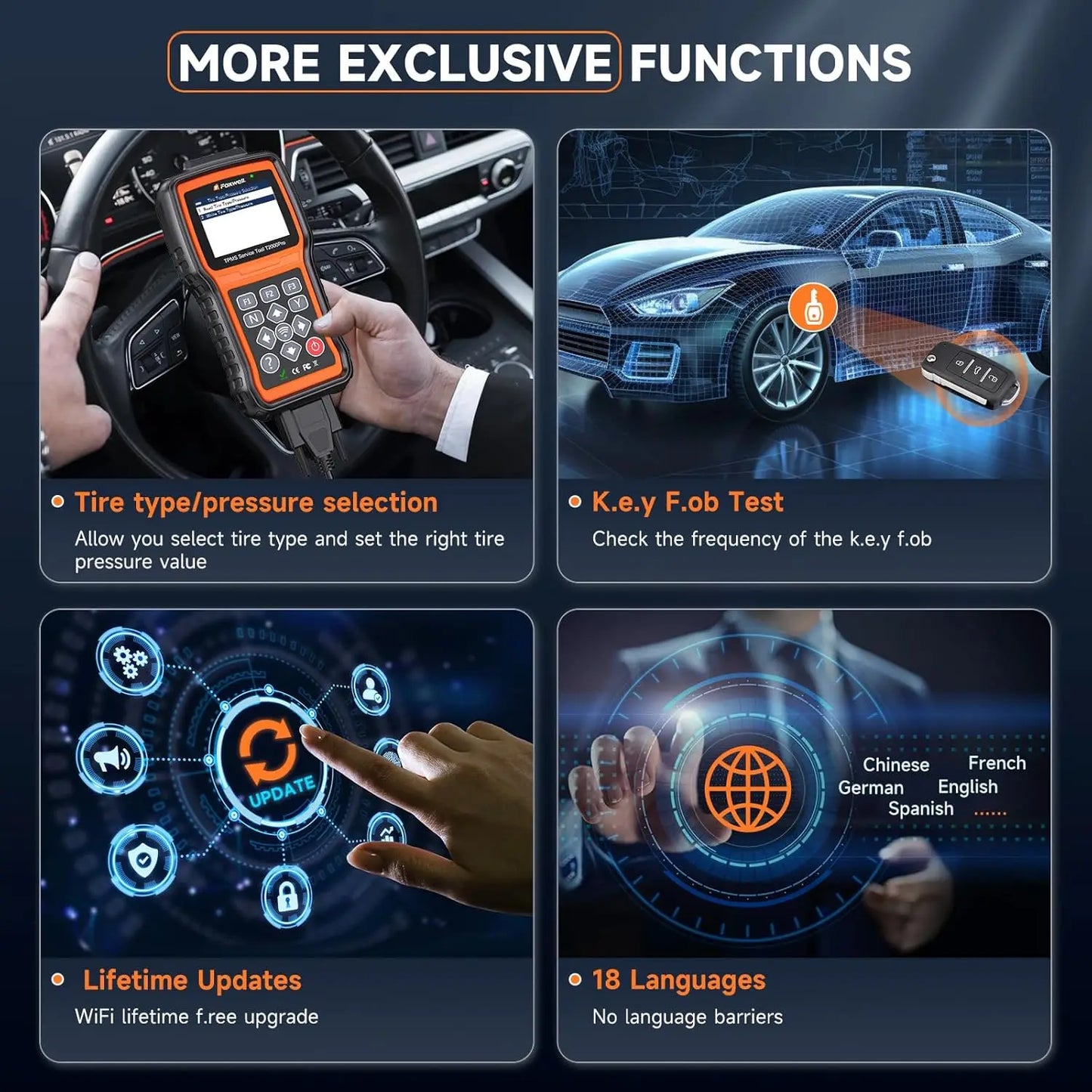
T2000 Pro can diagnose the TPMS system through OBDII connection to read codes and clear codes, and quickly find out faulty and turn off MILs. This tpms scan tool also with tire type/pressure selection functions: when the TPMS MIL is still on after faults are cleared, you need this function to set right value.Complete TPMS System Scan Tool
T2000 Pro can diagnose the TPMS system through OBDII connection to read codes and clear codes, and quickly find out faulty and turn off MILs. This tpms scan tool also with tire type/pressure selection functions: when the TPMS MIL is still on after faults are cleared, you need this function to set right value.

This TPMS programming function can only work with FOXWELL T10/t20 sensor.

With this TPMS programming tool, you can program FOXWELL exclusive T10/t20-sensor to meet the specifications of a particular vehicle before new sensor installation and relearn. Therefore, the healthy T10/t20 Sensors can measure tire pressure and temperature accurately, allowing you to know tire health conditions, which can replace more than 95% of the original or OEM sensors. 3 different sensor programming methods are supported by This FOXWELL TPMS programming tool T2000 Pro: Copy by Activation; Manual Create; Automatic Create; Copy By OBD. (Note: T2000 Pro only program a replacement sensor only if it is the FOXWELL T20 sensor.)

Relearn All Known TPMS Sensors

After a tyre change, tyre repositioning or TPMS sensor replacement, the system needs to relearn or calibrate the position of each tyre and the corresponding sensor information. This TPMS Tool offers 3 ways to relearn sensors.
➊Stationary Relearn: vehicle in learning mode to trigger sensors and learn sensor.
➋Auto Relearn: can be completed by driving.
➌OBD Relearn: use the T2000 Pro TPMS relearn tool to write sensor IDs to the ECU via the OBD interface.

Activate All-Known Brand Sensors

T2000 Pro TPMS service tool can activate all OEM/Universal TPMS sensors, enable you easily retrieve TPMS sensor data like Sensor ID, Tire Pressure, Tire Temperature, Sensor Battery, Sensor Position, Frequency, etc. It provides you with timely information on tyre pressure and ensures that the tyre pressure monitoring system is working well.

Check RF remote keyless entry (key fob)

Checks RF Remote Keyless Entry (Key FOB).
T2000 is able to check 315MHz and 433MHz RF remote keyless entry quickly.

More Advanced Features==OBD2 CHECK

OBD II menu lets you access all OBD service modes. According to ISO 9141-2, ISO 14230-4, and SAE J1850 standards, the OBD application is divided into several sub programs, called ‘Service $xx’. Below is a list of OBD diagnostic services:

● Service $01 - request current powertrain diagnostic data
● Service $02 - request powertrain freeze frame data
● Service $03 - request emission-related diagnostic trouble codes
● Service $04 - clear/reset emission-related diagnostic information
● Service $05 - request oxygen sensor monitoring test results
● Service $06 - request on-board monitoring test results for specific monitored systems
● Service $07 - request emission-related diagnostic trouble codes detected during current or last completed driving cycle
● Service $08 - request control of on-board system, test or component
● Service $09 - request Vehicle Information

T2000 Pro tire pressure relearn tool supports 18 languages.

English, Germany,French, Italian, Turkish, Polish, Swedish, Japanese, Korean, Spanish, Chinese etc.

99% VEHICLE COVEERAGE

Lifetime Free Update

the scanner can be updated to keep you stay current with the latest development of diagnosis.This section illustrates how to register and update your scan tool.

Step1: Obtain an FOXWELL ID. Step2: Register the product with the product serial number. Step3: Update the product by the update application FoxAssist.

Easy to use operation

The operation process and vehicle information of T2000 are so user friendly displayed that you can quickly navigate through to find what you need to get the operations completed. No training is needed.

PACKAGE LIST

1*T2000 Pro Main Unit
1*USB Cable
1*Battery Charger
1*Quick Start Guide
1*Blow Molding Case
1*User Manual